GTFreeFlyer
-
Posts
703 -
Joined
-
Last visited
5 Followers


.thumb.png.5df1987b2996b13507b528d68e459883.png)
-
I don’t remember ever changing the bindings. They should be default. I was always using my hat switch for trimming all of my modules up until this moment with the Corsair.
-
Thanks for adding this. I knew I missed some detail. Yes, in flight the physics and model are also working properly in the correct direction, for me. Nose trim up, brings the nose up and allows me to fly nice and slow hands off, just modulating the throttle gently for climb/descent rate.
-
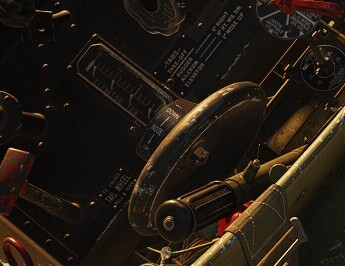
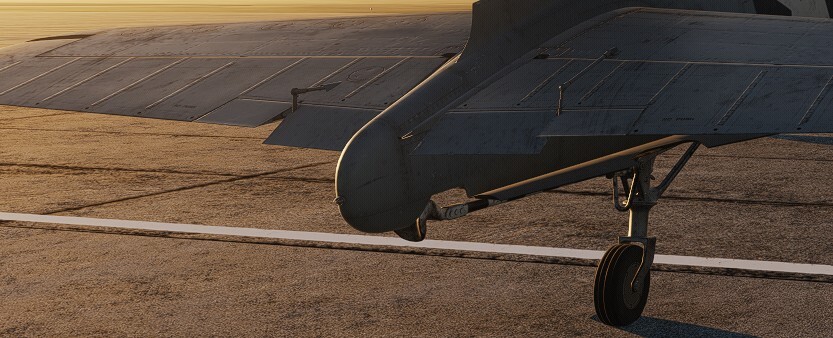
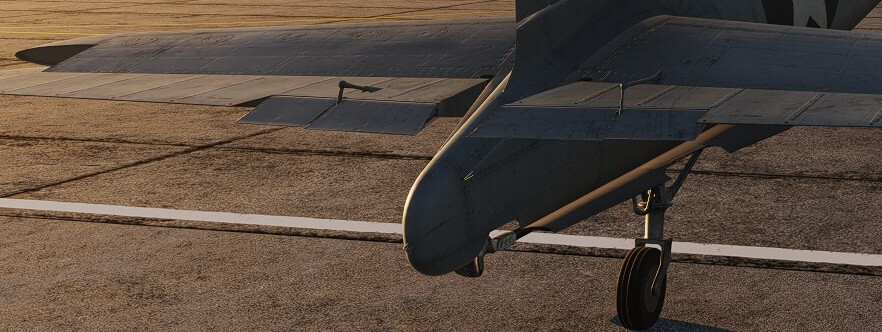
Strange indeed that it isn't working for some keyboard users. I went back to check everything, and what I said above still holds true, which makes it strange why it works for me but not others. Here's my setup: Everything is very vanilla (using all the defaults) Trim, nose down: Rshift + ; Trim, nose up: Rshift + . ALL OTHER TRIM BINDINGS REMOVED from the other inputs, and from the axis category as well The only mods on my system are Tacview, SRS, and Vaicom Pro. NO OTHER MODS installed. Mods are known to mess with things. I have never in all my years playing DCS touch the lua file that contains binding info where you can customize your bindings. I'm not even sure where this file is. Yes, I am using the latest update that came out a few days ago. Screenshots below: Prior to taking the screenshots, I held down the trim up binding (RShift + .) until the stop. Bindings shown for keyboard only. All others cleared out to make sure there are no conflicts. Trim indicator moved to +20 degrees and trim wheel animation rotated the wheel backwards (pilot would pull backwards on the top of the wheel) Before enabling my Moza AB9 FFB base, I took this picture showing correct movement of the elevator trim tabs. Yes! They are supposed to move down for an up-elevator trim. After enabling my Moza AB9 FFB base, I retook the picture because FFB will actually move my stick backwards, so you can see it here showing down trim tabs, and up elevator. I can't think of any other related setting or screenshot to share. If you need more info from me, just let me know. I'm just as perplexed as everyone else why it won't work this way for others. If you find out what the fix was for you, please share it here. Again, I am experiencing exactly what everyone else is describing, but only when I used my preferred binding on the joystick hat switch. Moving it to the keyboard fixed it. Moving it back to the hat switch broke it again. Settled on the keyboard binding for now. I haven't tired using an axis for trim. Cheers all.

-
That’s strange indeed. I did more flights later in the day after finding this and all is working normal for me. I’ll try to grab screenshots of my settings later when I’m on my PC next.
-
Strange about your low speeds. I just did more laps and traps and was never able to catch a wire setting it down above 90 knots. I had to be at 90 or lower. I am not getting any issues with the wing dropping out on me when that slow. I'm usually at 90 kts on the downwind, and I do the whole turn to final at 90 as well. Sometimes I get it down to 85 or a little less before touchdown, but it does get squirrely at that point. My suggestions is to air start at (or fly up to) 5,000 feet, and get slow and configure for landing. Trim it back to 15 degrees of elevator and see if you can just fly around hands off. Only make small movements with the throttle to maintain altitude. Use the elevator trim to set your airspeed (should be right around 15 degrees). Once it is stable at 90 knots, then play with the throttle to lock yourself into a 500 fpm descent, then level out, then 500 fpm climb. Get the hang of this. Next, try small turns to the left and right, all while staying at 90 knots, and trying not to lose any altitude (give it a little throttle in the turn to prevent altitude loss). It's a great exercise that will take only a few minutes and you'll get the hang of any plane with these slow flight exercises.
-
No problem. If you go back one page to the list of threads in this bug forum, it is currently adjacent to this thread. Here’s the link:
-
The plane flies mostly the same and handles the same for landing, but now requires 15 degrees trim for landing (was previously 10 deg). At 15 deg trim, wheels and flaps down, your plane will fly at 90 knots straight and level and I'm able to do the whole turn to final at 90 knots with the plane under control. There is almost no more room to pull the elevator back. Those of you without FFB may not know this because your stick will always have full travel from center to fully back, but the module won't give that to you. With my Moza stick, when I trim 15 degrees, the stick moves back quite significantly and I only have about another 1/4 inch of elevator throw to the back to play with, so the plane is very near its elevator throw limits with 15 degrees of trim required for 90 knots. It was difficult for me to catch a wire when approaching faster than 90 knots. Remember, you need to try and not use much elevator once you are trimmed out. Use throttle in slow & smooth movements to adjust your descent/climb rate to stay on glide path, not elevator. Leave the elevator alone, like seriously you can unbind pitch axis if you are brave enough, as you would still be able to land the plane. (I haven't actually tried unbinding the pitch axis, but now I just put that idea into my head and might do it) Once I cut engine and trapped, I had no elevator remaining to pull the nose up. I had to fly the plane into the deck at 90 knots with that 15 deg trim setting. Any faster, and I would just pass over the wires. I tested at full fuel and 40% fuel. I had a lot of issues and wasted a few planes landing at 90 knots with full fuel, but managed to trap it a few times. When I switched to 40% fuel, it handled MUCH better. Also, for those that say you can no longer get 15 degrees of trim after the new update, and that trim is reversed, there's a discussion about that in the bug forum. I found that there is no issue with it if you change to keyboard bindings for the trim. I had to move the bindings from my hat switch to the keyboard and everything works as it should. Please don't turn this thread into a discussion about this issue as we have that already in the bug section. Give it a try and let me know what you think. Cheers all. P.S. I attached tracks of some of my tests for you to see. I had not done carrier landings in about a month so I was a little rusty on the first few. The last one was my best. 01 Corsair slow flight test and then carrier approach at 95 kts missed wire, full fuel.trk 02 Corsair pattern and trap, no stick travel left for flare, full fuel.trk 03 Better Corsair pattern and trap, 13 deg trim, no stick travel left for flare, full fuel.trk 04 Better Corsair pattern, waveoff, trap, 15 deg trim, no stick travel left for flare, full fuel.trk 05 Best Corsair pattern, trap, 15 deg trim, no stick travel left for flare, 40 percent fuel.trk
-
This was an older thread I started about the FFB effects being backwards, not about the new issue where up and down are reversed. Someone else started a new thread about the new issue. M3 prefers separate threads for different issues, so continue the conversation there. I just posted that I also found the same thing as you, but there is actually no problem if using the keyboard binding for trim. Check it out. Cheers.
-
OK, what i'm finding is that trim is backwards if bound to my hat switch on my stick. However, when using keyboard bindings it works correctly, tabs move in correct direction, cockpit indicator moves in correct direction, AND it also moves my FFB stick in the correct direction. I think this might be how the devs tested it, because it is 100% correct if using keyboard binding. I am deleting my hat switch binding until its fixed so I don't get confused in flight. Again, it's working with the keyboard binding. The bug is in the definition of other input bindings.
-
Maneuvering On The Ground With Differential Braking
GTFreeFlyer replied to AG-51_Razor's topic in Bugs and Problems
Had a chance to play with the new update. Here's what I found... I cranked the wind all the way up to 30 kts and was able to taxi easily. Able to lock one wheel with brakes and pivot around it. The wheel seems to stick in place better, without the sideways translation is used to have, but you'll still have some skidding with high winds like 30 knots which is fair. The swivel animation is not yet correct. You can't see the tailwheel turn 90 degrees, but the planes handles as if it did turn 90 degrees. I found that locking/unlocking the tailwheel had no effect in slow speed ground handling, such as pivoting around one main wheel. I could not feel a difference in the way the plane spun around a single main wheel. However, when taxiing forward in a strong crosswind, locking the tailwheel does help to keep the nose straight, and it becomes obvious that it works because when you unlock it, the plane will weathervane into the wind as it should. Overall I think the devs did a great job in this update. The plane handles well, but it almost feel like all wind effects were turned off altogether below a certain speed. Spinning around in either direction was quite effortless in 30 kts of ground wind. I'll take it! So much better than it was. I think everyone in this thread will be much happier overall. Cheers.- 219 replies
-
- 10
-

-
Marianas Mayhem (18 mini-missions, DCS community project)
GTFreeFlyer replied to GTFreeFlyer's topic in Multiplayer
Thank you. Enjoy the campaign -
Pilot bails out from the bottom of aircraft
GTFreeFlyer replied to strayrat202's topic in Bugs and Problems
This is already identified in the known issues thread pinned in this forum.- 1 reply
-
- 1
-
-
No, not if you are seeking realism. We don't have deck crew, so respawning makes more sense than backtaxiing.
-
Correct. In the last update or the one before that it changed. The weathervaning effect is not correct. Turn the wind off and you’ll be able to turn. Read that thread. It’s all there.
-
Yes it’s broken, look at the 9-page thread about it right next to yours in the most recent list. “Maneuvering on ground with differential brakes”