VFA41_Hedgehog
-
Posts
137 -
Joined
-
Last visited
Content Type
Profiles
Forums
Events
Everything posted by VFA41_Hedgehog
-
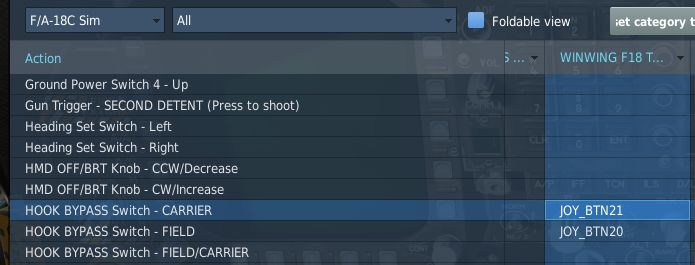
 a) After the DCS update/patch, you have to shutdown and restart SimApp Pro in order for it to re-add the Hook Bypass options that the DCS update/patch removed. b) Look for the DEFAULT.LUA file somewhere around here: C:\Program Files\Eagle Dynamics\DCS World\Mods\aircraft\FA-18C\Input\FA-18C\joystick c) Open it with a text editor and find the section called LEFT VERTICAL PANEL. d) In that section, find the lines related to Hook Bypass. There will now be a separate line for FIELD and for CARRIER. e) Find the typo in those two lines. It says "CPT_LIGTHS" in 2 places. Fix them to say "CPT_LIGHTS" f) Save the DEFAULT.LUA file. When you restart DCS and look in F/A-18C controls, you will see the two bindable options for FIELD and CARRIER as shown in the original post. Assign the switch positions. It will work now. NOTE: I don't know exactly how SimApp Pro works. (I'm not sure that anybody does...) This process MAY require that you have activated a Key Binding profile within SimApp Pro. The Launch Bar switch is an entirely different ballgame. WinWing has not chosen to provide discrete switch positions for that switch for some reason. There are other edits you can make to the DEFAULT.LUA fie to make it work, but that's another discussion (see below).
 -
After today's update, I'm pretty sure I confirmed that Winwing's SimApp Pro adds the CARRIER and FIELD option lines in DEFAULT.LUA. HOWEVER, their script inherited the "CPT_LIGTHS" typo from ED. When ED fixed it, Winwing did not (yet), so the typo is re-introduced and must be manually fixed after each patch/update.
-
HOWEVER.... I managed to fix it. Note please in the DEFAULT.LUA, Eagle Dynamics failed to correct every instance of the "ligths" typo. The typo still appears in the lines above in the LEFT VERTICAL PANEL section. Fix it in two places. Works properly now as I set the bindings in the original post. Hopefully (though doubtfully) ED will fix this. If not, it will need to be manually corrected after every patch in order for those bindings to function.
-
This is ALREADY in the DEFAULT.LUA after v2.7 Open Beta. { down = cptlights_commands.HookBypass, up = cptlights_commands.HookBypass, cockpit_device_id = devices.CPT_LIGHTS, value_down = 1.0, value_up = 0.0, name = _('HOOK BYPASS Switch - FIELD/CARRIER'), category = {_('Left Vertical Panel')}}, { down = cptlights_commands.HookBypass, cockpit_device_id = devices.CPT_LIGTHS, value_down = -0.5, name = _('HOOK BYPASS Switch - CARRIER'), category = {_('Left Vertical Panel')}}, { down = cptlights_commands.HookBypass, cockpit_device_id = devices.CPT_LIGTHS, value_down = 0.5, name = _('HOOK BYPASS Switch - FIELD'), category = {_('Left Vertical Panel')}}, There is NOW a separate option for FIELD and for CARRIER despite what some ill-informed persons may tell you. [EDIT] Problem corrected by fixing the typos in RED above.
-
Actually, they are, as illustrated above.
-
I am using an edited DEFAULT.LUA file, HOWEVER the binds illustrated above ARE default sim commands (not added by the edit). They don't work. In the Left Vertical Panel section.

-
Tried to bind to Warthog throttle buttons and Winwing PTO panel switch. DCS 'sees' the inputs, but does nothing in the cockpit when bound as shown.
-
Please make Screen Shot a bindable command so that it can be assigned to a HOTAS button press.
-
F/A-18C HOOK BYPASS switch does not respond to any buttons bound from any device. EDIT: this appears to function as a magnetically held switch that snaps to CARRIER when the plane is powered down. Tested with engines running and buttons bound from both Winwing PTO panel and from Warthog throttle.
-
Check out www.vfa-41.com
-
After only a 2-week R&R and inter-deployment training period, the Black Aces of VFA-41 are on their way again to the volatile Persian Gulf region. VFA-41 Black Aces
-
VFA-41 Black Aces - US-based Carrier Squadron
VFA41_Hedgehog replied to VFA41_Hedgehog's topic in Jets Squadrons
After only a 2-week R&R and inter-deployment training period, the Black Aces of VFA-41 are on their way again to the volatile Persian Gulf region. VFA-41 Black Aces -
VFA-41 Black Aces - US-based Carrier Squadron
VFA41_Hedgehog replied to VFA41_Hedgehog's topic in Squadron Recruiting
After only a 2-week R&R and inter-deployment training period, the Black Aces of VFA-41 are on their way again to the volatile Persian Gulf region. VFA-41 Black Aces -
VFA-41 Black Aces
-
VFA-41 Black Aces - US-based Carrier Squadron
VFA41_Hedgehog replied to VFA41_Hedgehog's topic in Jets Squadrons
The Black Aces of VFA-41 have completed their deployment in support of Operation Caspian Clash and returned to home port for some well-deserved R&R. Training work-ups for the next deployment are already underway. www.vfa-41.com -
VFA-41 Black Aces - US-based Carrier Squadron
VFA41_Hedgehog replied to VFA41_Hedgehog's topic in Squadron Recruiting
The Black Aces of VFA-41 have completed their deployment in support of Operation Caspian Clash and returned to home port for some well-earned R&R. www.vfa-41.com -
The Black Aces of VFA-41 were tasked with providing close air support for a convoy carrying a delegation of government representatives to peace talks in eastern Georgia. Suffice it to say that all did not go as planned. The mission was part of the squadron's continued support of NATO's 'Operation Caspian Clash.' Catch up on the action HERE.
-
Although still embroiled in Operation Caspian Clash, the Black Aces of VFA-41 reached the end of the line period on the Greenie Board and have crowned a new King! Witness the coronation and follow the action here: VFA-41 Black Aces
-
VFA-41 Deployed in Support of Operation Caspian Clash
VFA41_Hedgehog posted a topic in Squadron News
Having recently departed the Persian Gulf region, The Black Aces of VFA-41 are with the USS Theodore Roosevelt carrier battle group which has been directed to station in the Black Sea off the coast of Georgia at the request of NATO to provide support for allies against aggression from neighboring states. Follow the action as it happens here: http://www.vfa-41.com -
Mine's the same, but I don't have the 2nd stage mapped to anything, so I never noticed.
-
I use two MFDs for my Hornet 'pit, but they are not mapped to the actual DDI buttons. I just bound whatever functions I wanted to each button, like A/A and A/G master mode buttons, or open/close canopy, for example. I also created a PowerPoint template to print out card inserts to label the buttons. I've attached the file. Just overtype the button labels and print out on cardstock. Cougar Template 02.zip
-
Late to the discussion, but similar experience with TM Hornet Grip. First one: trim hat defective. Stuck in 'left down' position when not touching it. Returned to Amazon retailer for replacement. Second one: thumb switch sticks in fwd position when not touching it. Returned to TM support. Still waiting.
-
[W.I.P]AMPCD Night/Day blightness selector
VFA41_Hedgehog replied to Lau's topic in Bugs and Problems
GAIN and SYM rockers now both work on AMPCD. Give those a shot. -
TM F/A-18C Hornet grip - Can't Re-Assemble
VFA41_Hedgehog replied to speedbird5's topic in Thrustmaster
Disassembled mine and had the same nightmare. Cannot explain how I get it back together... fiddled with the spring for at least an hour with tweezers and jeweler's tools and just got lucky. Good luck. -
I'm not a real Hornet pilot, but this doesn't seem like proper behavior. Tested and repeatable: MASTER ARM must be ON for AIM-9X to uncage (no radar lock).