Dunska
-
Posts
118 -
Joined
-
Last visited
1 Follower
-
Reshade 6.0 gets native support for OpenXr
Dunska replied to speed-of-heat's topic in Virtual Reality
If it is just for NVGs, then this mod gives some amazing NVG effect with many options for 2D and VR. I love the full screen white phosphor. https://www.digitalcombatsimulator.com/en/files/3345896/ -
Double tap on the right-hand side just in front of where the strap connects.
-
Great new SimAppPro version 1.16.68 just released, which includes (among a heap of other things): 15. Added comprehensive key binding and haptic feedback support for additional DCS aircraft models: - MB-339 - F4U-1D Corsair - F-5E Flaming Cliffs 2024 - F-86F Flaming Cliffs 2024 - MIG-29 Flaming Cliffs 2024 (All variants MIG-29A, MIG-29S) - New MIG-29A Fulcrum full fidelity - Su-25A (SimAppPro only have Su-25T variant) - MIG-15 Flaming Cliffs 2024 - Kiowa - CH-47 Excellent! Thanks @WINWING / @WinwingTech
-
Sorry to hear that mate You could try the chat in the PPlay client - that's what I used. Also, it wasn't Tech Support who extended the trial time, it was Customer Support - they took a few days to respond after Tech Support sent across the request for a replacement 50ppd module.
-
I don't use sharpening set in PPlay or DCS - I only use the foveated area sharpening in QVFR at 70. Setting sharpening in multiple places seems to be counterproductive and cause issues like shimmering.
-
As soon as I described my symptoms and all the things I had tried for troubleshooting, they offered to send the normal 50ppd as a replacement and I accepted. They extended my trial and said it would be extended to 7 days after I received the replacement module to allow me time to test. I keep the UW until I can test the new optical engine and decide to keep the Super or not. I used the online chat and support were very quick to respond. No ETA on the replacement optical engine though, so could be a while. Mura is present when looking at bright backgrounds like the sky and clouds. I can see a fine horizontal and vertical mesh/bars when moving my head around - annoying, yes, but I could probably overlook that if the picture was sharp, undistorted, had minimal CA and FOV was as advertised. I've been very happy with Pimax support responsiveness and willingness to resolve - I just hope the 50ppd is better and arrives soon.
-
If you use mbucchia's Quad Views instead of the native Pimax QV, there is an option for "Transition Thickness" that makes the transition from focus area to peripheral area less obvious. Also seems to perform better than the native QV (for now anyway).
-
I have many of those same symptoms, including my right eye seems out of focus no matter what I do. A friend also tried it and agrees the right eye is out of focus, so not just me. Bad CA and distortions, only 124 FOV (which is less than the normal 50pp, should be around 138 in the ultrawide). I also see what looks like glare, or as you said a smudge on the lenses in certain scenes, but they are clean. Support are sending me a normal 50ppd optical engine to replace the ultrawide, so we'll see how that goes. I also have a 9800X3D and 5090 and have been tweaking up my settings for the Crystal Super. I found the best options for me was to disable HAGS in Windows, set the headset to 90 Hz, High res (1.0) and set DCS to have an FPS cap of 90 fps as well. This smoothed things out quite a bit for me. I also run flat terrain shadows (makes a big difference to CPU/frame rate for a minimal visual hit to my eye). I also run mbucchia's Quad Views instead of the native Pimax QV - with 25% H and V size, -10 vertical offset, 125% foveated res and 5% peripheral res. No sharpening in Pimax Play or DCS, but 70 foveated sharpening in QV. Also no Turbo Mode in QV. Pays to check as Pimax Play defaults to 0.6 sharpening and mbucchia's QV default to Turbo Mode on. For the object at top of your view in the F/A-18 and F-16, that is the new visor/helmet 3d model from the latest DCS patch. Distracting and the colour dulls the visuals. I wish there was an option to disable it. You can toggle the visor up and down with a keybind, but with it up you don't get the JHMCS.
-
Reshade 6.0 gets native support for OpenXr
Dunska replied to speed-of-heat's topic in Virtual Reality
ReShade 6.6.2 just came out which fixed a couple of crash issues... might be worth a try. 6.6.2: Fixed crash in Dead by Daylight Fixed crash in some games when an add-on modified the swap chain back buffer format Fixed hooking when application uses NVIDIA Streamline (e.g. Deadspace) (Add-on support) Added resource flag for immutable resources (Add-on support) Fixed crash in Vulkan when using resource handle with ReShade API that has no private data attached anymore -
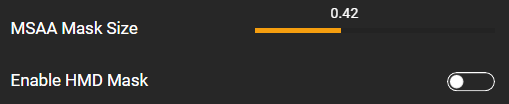
The slider is above the switch: null

-
Would be great to get the MIG-29A Fulcrum FF added for shaker/vibration support. @WINWING - is there any ETA or info you can share on that?
-
Oh, ok. I searched this wish list forum for afterburner and also detent and could not find anything.
-
I find that I need a ~40 curve on my throttle to get it to match the AB detent in the MiG-29A. It would be great to have an "Afterburner detent percentage" special option like the F-4E has, so we can leave the throttle with no curve and just adjust when the AB kicks in via the percentage option.
-
You can use this in the meantime. Breaks IC though. MiG-29A (Full Fidelity) Visor Reflection Remover for VR https://www.digitalcombatsimulator.com/en/files/3347017/
-
Change Cockpit Display Resolution to 1024 and tick every frame and see how it goes. I would also not select "Force IPD Distance" - just leave that default. FSR will also cause some blurriness - you could try cranking up the sharpening a little also.