jackd
-
Posts
834 -
Joined
-
Last visited
Content Type
Profiles
Forums
Events
Everything posted by jackd
-
Steam: 2.9.8.1214+ FPS performance issue
jackd replied to scommander2's topic in Game Performance Bugs
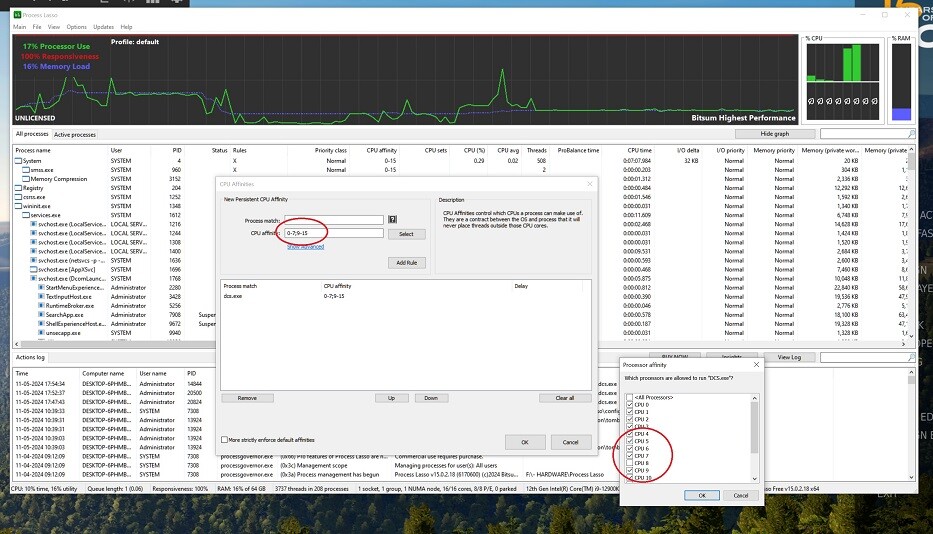
the fix right now seems to use projectlasso from Bitsun, where you can save the settings for core 8 affinity off only when DCS.exe is active, tip was from ED supporter Alexander:
-
Yep, i think fixed, tip was from support, Alexander ... but if you can make a script it would be great, especially if it works only when DCS is running.
-
I just tested processlasso, rule set and tested. Switches core 8 off nicely, and on again after closing DCS.: PS DCS should fix this or compensate with something useful LoL. processlasso costs 29 $ for 1 PC.
-
Thanks, it was off for maximize on my system .. but it is still the same alas.
-
nope, paid premium, and with all the tuning. especially firewall, etc i still like it better than say Bitdefender, also paid for ..
-
Nope, Avast premium, and DCS is bypassed ... thnx
-
Use msconfig.exe via startmenu to set your boot before exit either in 11 or 10. best is to intall the second windows versions fresh on unallocated space. Best would be also to export your Saved Games position to drive G as well, do this via both windows versions when active, right click Saved Games folder in your users *name* folder - properties, location. Backup the content first with the DCS stuff for safety and then manually into that folder. Your boot will change to drive C, anyway, and the non active on my system to D as i left that drive partition unselected in computer management PS, have to activate my wireless mouse again after each switching, so keep a wired mouse connected. Maybe it's the same with a wireless keyboard ...
-
Hab's gemacht, via dual-boot. Ein Mensch wird nicht fröh davon. Wie im Kindergarten ...
-
Still not as of DCS 2.9.9.2406 just released? They blow up fantastic in IL2 Great Battles, when you hit them with your spit in mid air.
-
Stuttering in and outside the cockpit with the new update.
jackd replied to Cobra5087's topic in View and Spotting Bugs
-
Done tons of OS and NVIDIA testing, various settings, tips from support .... ALL in vain. Every time i start DCS i have to manually switch off core 8 in taskmanager details Last reply from support was "the devs consider it fixed". NOPE, NOT, NADA! ================================================================= By now i am open for any possible fixes, the last DCS that worked fine for me was 2.9.8.1107. Just finished installing windows 11 pro, and the latest DCS 2.9.9.2280 Makes no difference. All other simstuff like MSS2022, IL2 Great Battles, runs fine. dcs.log
-
Plunge, installed 566.03 from NVIDIA, stuttering is still there on second game start with core 8 affinity on ....
-
Steam: 2.9.8.1214+ FPS performance issue
jackd replied to scommander2's topic in Game Performance Bugs
By now i am open for any possible fixes, the last DCS that worked fine for me was 2.9.8.1107. Just finished installing windows 11 pro, and the latest DCS 2.9.9.2280 Makes no difference. -
Steam: 2.9.8.1214+ FPS performance issue
jackd replied to scommander2's topic in Game Performance Bugs
Stuttering in 2nd game start when core 8 affinity is on with windows 10 LTSC and 11 Pro. Some forum post i saw suggested to install windows 11 pro (dual boot, still hate it for all them graphics interface changes). BUT the stuttering is there ALSO on second game start & play. Definitely this bug is NOT fixed on my system. -
Maximum height UH_1H after take off?
jackd replied to jackd's topic in Controller Questions and Bugs
longtime support chat going on testing various settings .... am now trying to use windows 11 pro instead, but i hate this windows .. all that bulls**tt not present in 10 LTSC. -
Maximum height UH_1H after take off?
jackd replied to jackd's topic in Controller Questions and Bugs
Yesterday's update is now installed, and my settings without changes seem to work OK now. But the stuttering still happens until l i switch off affinity for core 8. -
On mine its 297 GB, and Saved Games 690 MB. DCS is why i bought a large M2 SSD recently. All games installed on a separate drive. ================================== Q: I read that DCS is only in MT version now, but i still have a bin and a bin-mt folder both filled about 570 MB ... How's that?
-
Stuttering in and outside the cockpit with the new update.
jackd replied to Cobra5087's topic in View and Spotting Bugs
You could try switching off Hyperthreading in your motherboard BIOS, and use the DCS.exe from the bin-mt folder instead. -
Maximum height UH_1H after take off?
jackd replied to jackd's topic in Controller Questions and Bugs
Hi Max, not yet, alas no time so far. The defaults are completely different to what i am used to BTW, need to be heavily adapted for me. Pff, where are the days that just a PS4 controller was enough. ADDED: still messing around, tend to give it up again, as i cannot get my axis TM warthog joystick and throttle settings to "feel"right. -
Maximum height UH_1H after take off?
jackd replied to jackd's topic in Controller Questions and Bugs
OK, cancelled the reinstall. Thnx -
Maximum height UH_1H after take off?
jackd replied to jackd's topic in Controller Questions and Bugs
Just started reinstalling the whole DCS ... -
Maximum height UH_1H after take off?
jackd replied to jackd's topic in Controller Questions and Bugs
I have zoom in slow on 2 buttons of the joystick, and the slider on the throttle unit as well. I don't have the glitching. That green bar is always there and is set called lifebar? ..........\DCS World Openbeta\Mods\aircraft\Uh-1H\Cockpit\Scripts\LifeBar If i delete-rename Saved Games with my careful edited profiles for other planes will i loose all that? Game mode, where can i find that? -
Maximum height UH_1H after take off?
jackd replied to jackd's topic in Controller Questions and Bugs
Thanks for looking, that jittery screen jumping i don't have only stuttering when i leave core 8 active. tested the track, playback stops at a certain point before the crash while trying lo land. I cannot get the heli to hover above the take off point and then move forward, let alone take off moving forwards. -
Maximum height UH_1H after take off?
jackd replied to jackd's topic in Controller Questions and Bugs
Hi Max, a track. Take off OK, but i cannot get it to reduce forward speed, hover and land without a barbecue ... Huey crash 01.trk Wathhog Throtthe used settings here: -
BUMP!