
Despayre
-
Posts
473 -
Joined
-
Last visited
Content Type
Profiles
Forums
Events
Everything posted by Despayre
-
Nothing to add here, just wanted to say it was cool to read a thread where ppl worked the problem, tried to come up with ideas/solutions, and no one's being an idiot... and it's not even my birthday!
-
Not now, maybe someday. It has been mentioned by HB, but we have not seen it yet.
-
I know for the F-14, there's an option in Special, that allows you to set the" Radio Menu and PTT behaviour" which allows you to show, or not show, the options. Could that have been reset when you did the repair?
-
I had a weird thing with the F-4, where every time I pressed my Comms button, the engines would throttle up... (super-annoying when practicing AAR), turned out, my HOTAS was sending a keyboard "+", which was my keyboard mapping for throttle... I removed the keyboard binding, problem went away. Why do you care? Cuz it might be something similar for you. Unless you use them, try removing the keyboard bindings (including the "B") and see if that makes any difference.
-
This is not normal behaviour. I'm not sure why your speedbrake would come on at an idle at any time. Mine definitely does not do that. Are you sure you're using the right bindings? There's several that are similar, but provide different options. For opening the speedbrake, I use "Speed brake extend", which expands as long as I hold it down, or until it's fully extended, and for closing it, I use "Speed brake retract " which brings it all the way down without any stops when engaged. In the air, or on the ground, no matter what I do with the throttle, if I don't touch my speed brake, it does not move.
-
I seem to remember that was a change made for... reasons... it used to be done automatically, and at some point they mentioned the totalizer would not be automatically correct anymore... don't recall why.
-
In your Vaicom options, there is an option to suppress the Comms menu from appearing. If for some reason you need to see the menu, you say "options", and then "take 1/2/3/etc" to get where you wanna be.
-
I can do it in the 14 and the 15, but has anyone worked out how to drop the engines to shut-off when you move the Orion2 throttle back past the detents (and idle once you are pushed up past them)? I either can't remember how it's done, it's different for the 4, or I'm missing something... or it can't be done .
-

DTC for DCS - new version 7.2.0 - Apache added
Despayre replied to SFJackBauer's topic in DCS Modding
I believe it's looking for the "Scripts" folder, inside of your \Saved Games\DCS\ folder... wherever that scripts folder is, that's the path you're looking for (minus the "scripts" since it will be assumed that subfolder exists, which it will if your DCS works). If you manually typed out that path, try using the correct dividers, Windows uses \ not / like linux. ie, c:\users\[your user name here]\Saved Games\DCS... -
[Official] SimShaker for Aviators
Despayre replied to f4l0's topic in PC Hardware and Related Software
SSA beta 2.7.5 popped up today... -
Haha, I did this for the first time the other day, started to get hypoxia, spent 5 seconds thinking "What the hell is this now??!"... lol... nice touch of realism there.
-
F-4E Phantom II Development Update and Release Delay Announcement
Despayre replied to IronMike's topic in DCS: F-4E Phantom
Soo... pretty solid proof that the DCS forums aren't a jet engine then. -
You can do either. There are some options on the Jester wheel to turn them over to him, and what he will do. I usually do it myself, and I have heard from others that Jester tends to be a little too paranoid when it comes to their use, YMMV. (With VAICOM, try "countermeasures, auto" for Jester to take them over). You can look at the additional screenshots for use with VAICOM here, there's one that shows all the Jester options too: https://www.digitalcombatsimulator.com/en/files/3327935/ PS, your sig says "VIACOM", it's "VAICOM", but I won't take any marks off... this time.
-
Either, you answered a completely different question, or you're so far advanced on this topic, I can't even see you from where I am... take your pick.
-
Dumb question but, did you click the "Show all routes" button at the top of the F10 map?
-
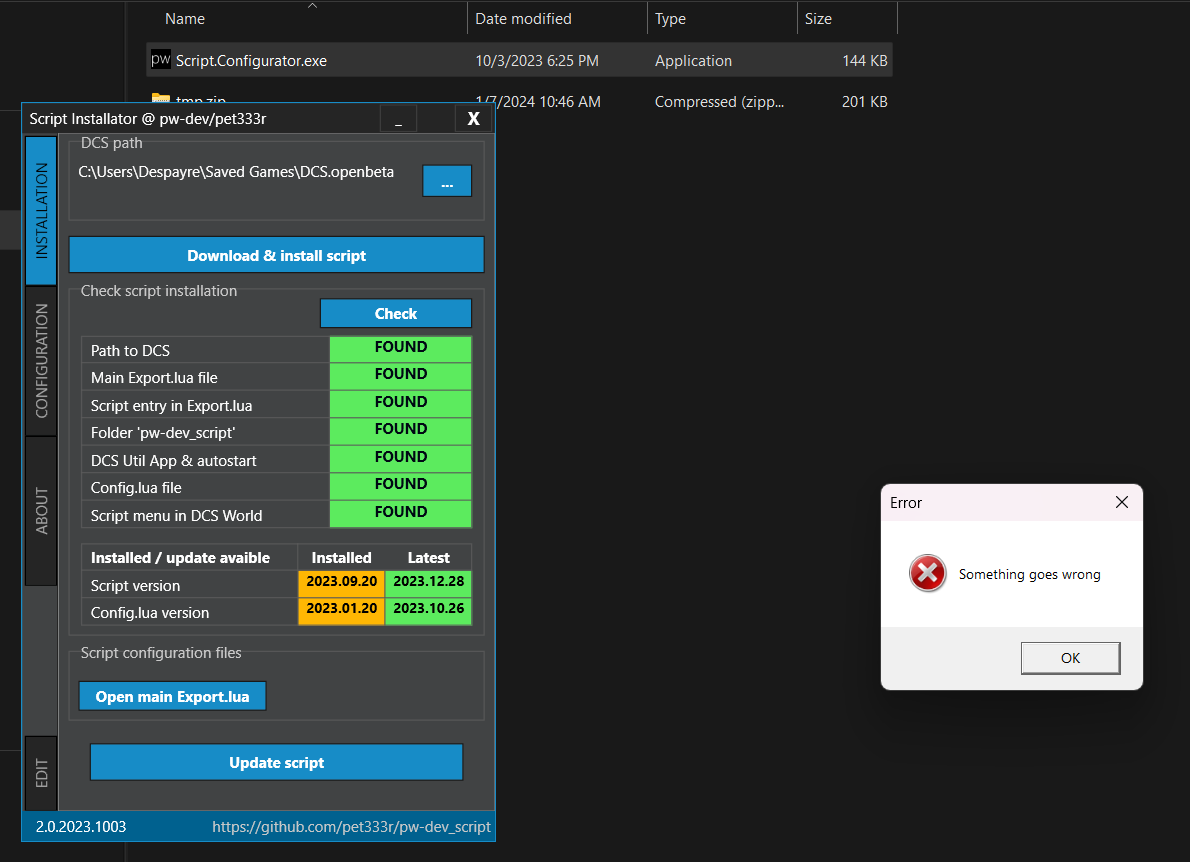
I just renamed the pw-dev_script dir first, and that seemed to do the trick. Thanks for that quick reply!
-
Clicking on "Update script" seems to only give an error... Totally beside the point, "Something goes wrong" should be in the past tense, "Something went wrong".

-
Never got it solved. AFAIK, it still doesn't work on the 15. It does work just fine on the 14 though, and I have the 18 but never fly it, so I'll take your word for that.
-
Fiverr has a lot of DCS skin creators for a few bucks, or you could try in the skinning thread here too I suppose.
-
A few simple questions about flying F-14 with and without AI RIO help
Despayre replied to talvikko's topic in DCS: F-14A & B
I have never had to jump into the RIO seat to do anything before firing a Phoenix. -
Well that seems really excessive... I think the easier and more obvious solution is, just stop flying the 18.
-
Have you tried ... NOT setting your plane on fire? /s (but ya, it's not great for sure)
-
My basic launch parameters for the Phoenix... at least 60 miles out (and assuming Jester has already locked them up) Above 30,000 The faster the better, mach 1-ish at least. When ready to fire, I angle up 30 degrees, and do a roll so that the missile leaves the rail while my belly is pointed at the sky (timing is just practice), and it's generally pointed the way it's going to loft anyway I hit more than I miss. YMMV.