Floyd1212
-
Posts
1376 -
Joined
-
Last visited
Content Type
Profiles
Forums
Events
Everything posted by Floyd1212
-
Waypoint Add: IDENT: Flips off too fast
Floyd1212 replied to Captain Orso's topic in Bugs and Problems
I sort of see what you are saying, but if you press L1 again do you get the box back, and the prompt IDENT: again on the KU? It does appear that when unboxed, holding the button "boxes", then "unboxes" the function, like you had double-tapped it. -
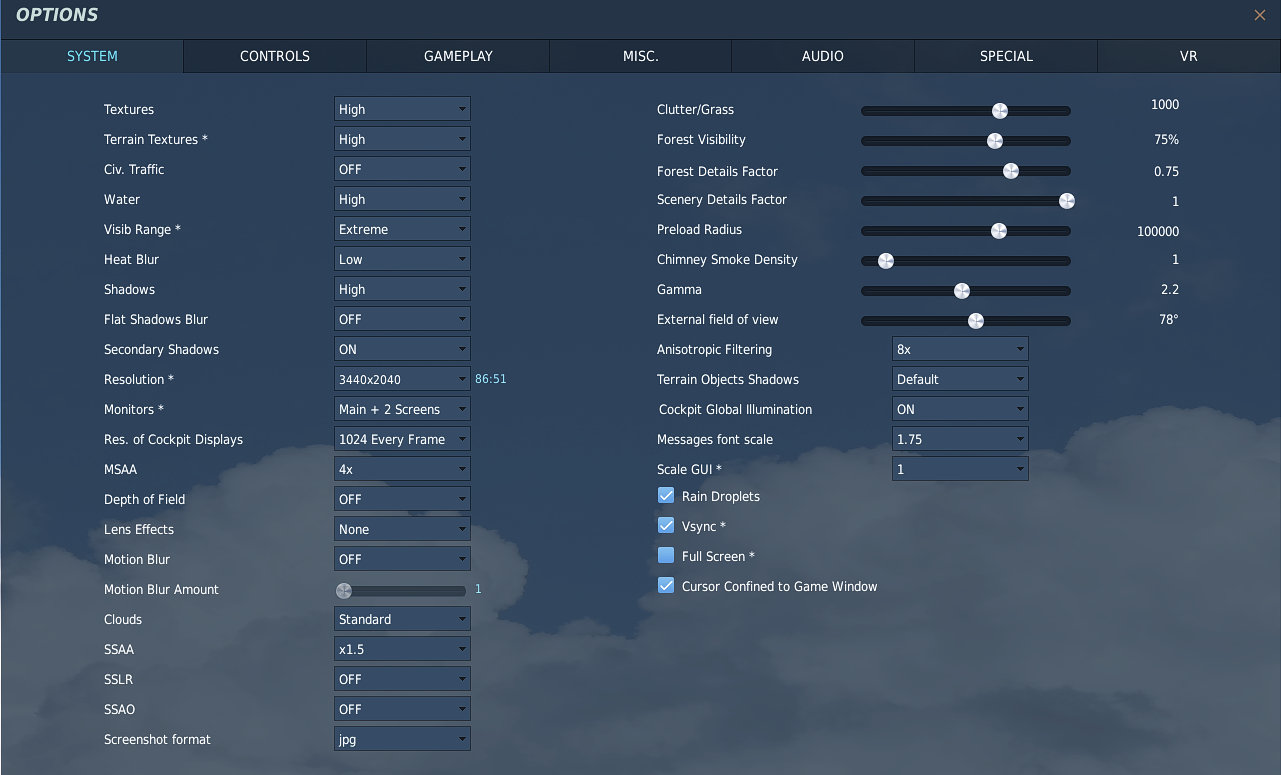
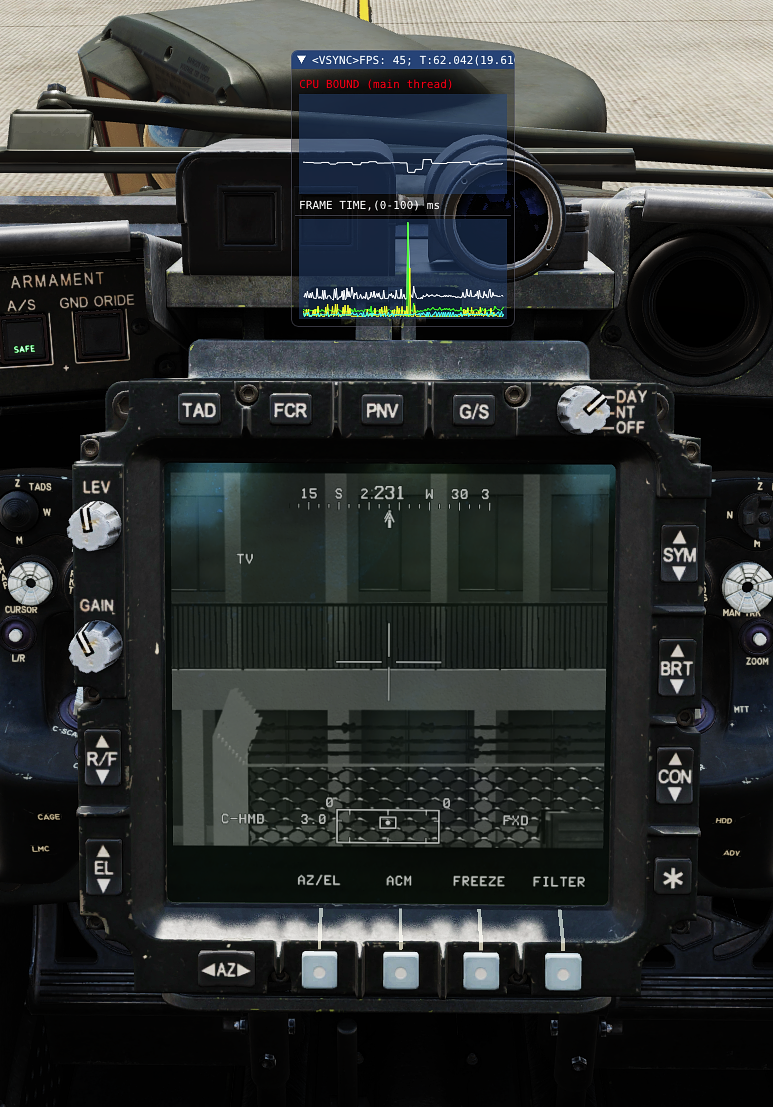
I played your new track and got similar results as last time. FLIR Wide = 60 fps (vsync) FLIR Zoom = 60 fps (vsync) TV Wide = 53 fps TV Zoom = 47 fps These are my graphics settings. (I make no claim that these settings are optimized): Does it matter what you are looking at with the TADS? Same results when looking at the sky? Are you exporting the TEDAC display to an external monitor?

-
Maybe there is a better thread somewhere for providing support for Scratchpad? This is the official thread for discussing The Way, as created by the author, for announcing new releases and providing troubleshooting support.
-
I got a bunch of script failures when launching the track for playback. But after clicking through all of them, and watching my FPS while you were switching between TADS modes: FLIR stayed at 60 FPS (vsync locked to 60 for my monitor) TV dropped to about 45 FPS for both levels of zoom. I didn't see any difference when you went from Wide to Zoom. I am running MT on a Core i7-9700K 64GB of RAM, and a 3090 w 24GB of VRAM. I will be interested to see what others are getting on the same combo you are running. Obviously, there are other graphics settings that could be different, as well.
-
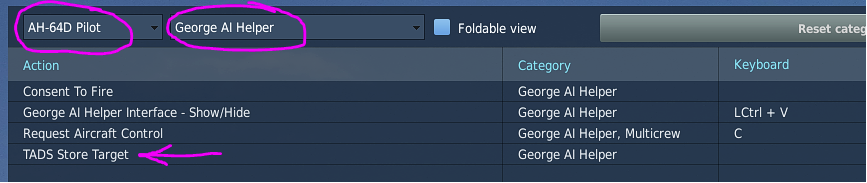
Yes, there is a recently added bind for telling George the CPG to lase and store the currently highlighted item on the targets list. After he stores these targets into the TSD, you can swap seats with him and pull them up from the COORD list and engage them yourself from the front seat.
-
fixed Engines not starting at high elevations/high temperatures
Floyd1212 replied to a topic in Bugs and Problems
The short-term solution is to change the player slots in your mission to hot-start for now. -
correct as is IHAADS boresight fail
Floyd1212 replied to DmitriKozlowsky's topic in Bugs and Problems
Agreed. An option to automate the process would be helpful. In the meantime, the saved Snap View is the best answer. Bring up WPN page Press Boresight Press IHADSS Hold down Snap View button Press BS NOW Release Snap View button Yes, it takes a few minutes to set it up the first time, but then you avoid the hassle for each cold start going forward. -
correct as is IHAADS boresight fail
Floyd1212 replied to DmitriKozlowsky's topic in Bugs and Problems
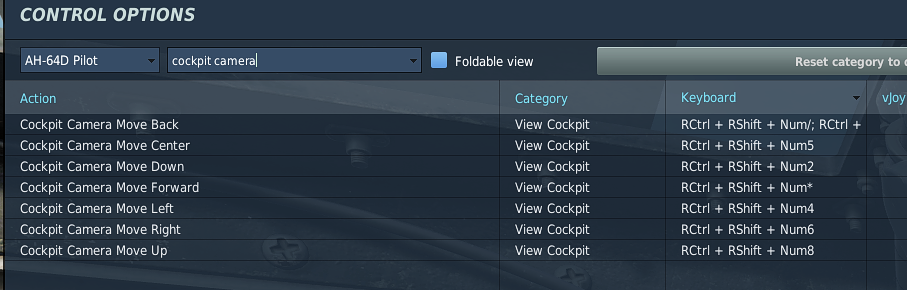
Nice. I don't think I have ever seen a more perfect borsesight performed. That even looks easier than me trying to do it with my TrackIR. Dmitri, these are the keys you need to use to translate the camera; it has nothing to do with "nudging" anything.
-
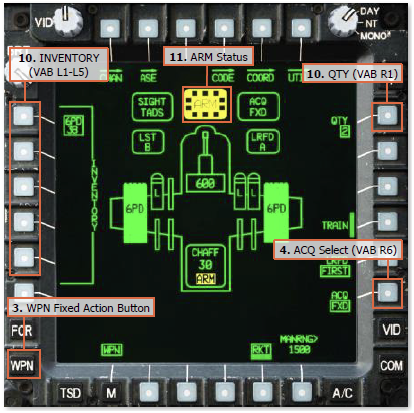
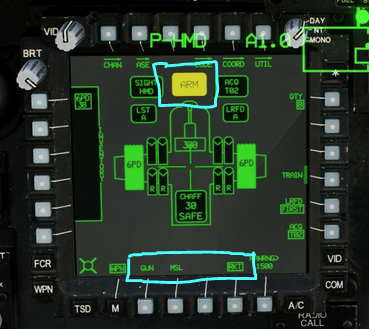
You don't have rockets WASed. This indicates your CPG has rockets WASed: This also indicates you don't have rockets WASed: When properly WASed, as shown in the snip from the manual below, notice the differences in the areas I boxed in blue above: You must use the binds on the cyclic or HOCAS to WAS weapons, not by pressing buttons on the MPDs.
-
correct as is IHAADS boresight fail
Floyd1212 replied to DmitriKozlowsky's topic in Bugs and Problems
It doesn’t sound like you are doing it correctly then. But if you want to fly without boresighting, I’m fine with that, too. Everyone here is just trying to help. -
I still prefer the look and feel of The Way over Scratchpad, but no one says you have to switch from what you are using. You do you.
-
Yes, Scratchpad has added the "transfer" function in a recent release, so both utilities are more similar now. However, I still prefer the polished look and feel of TheWay, and installation seems more straight forward to not have to worry about adding plugins.
-
As others have said (and like I said in the 2nd post of this thread), you WAS weapons for deployment with the controls on your cyclic, not by pushing buttons on the MPD. Up = Gun Right = Missiles Left = Rockets
-
correct as is IHAADS boresight fail
Floyd1212 replied to DmitriKozlowsky's topic in Bugs and Problems
You are looking for camera controls. You want to translate the camera position up/down/left/right along with changing the angle of the camera up/down/left/right. As others have already said, these are the controls for translating the camera position: After playing around with it for 15 seconds, I was able to position the HMD correctly for boresighting with just keyboard presses. It is possible, though not very convenient . To make this process even easier in the future, get everything lined up properly and save that camera position as a Snap View. From that point forward, you can simply recall the saved snap view and the camera will snap into the correct alignment for boresighting. You can follow these instructions I posted in another thread for saving the Snap View. I would highly recommend purchasing some sort of head tracking hardware to make your life in the Apache more rewarding and enjoyable. Yes it is possible to fly the Apache without head tracking, but it makes the whole experience exponentially better.
-
I can see how this might make sense if you are in the front seat and George is holding the hover for you in the back seat, but if you are in the back seat, and you need to take your hands off the cyclic, hold modes are the only way to go.
-
Not sure exactly what you mean here, but selecting RKT across the bottom of the WPN page is not the same as WAS'ing rockets for deployment. You can select any of the weapons systems from the WPN page to change settings, like missile code or rocket quantity, but if you want to action the weapon you need to use the WAS hat on the cyclic. When WASed you will see the dotted box around the SAFE/ARM Status indicator, and only then you will get the rocket steering cursor symbology.
-
Transitioning to and from Hover for Dummies?
Floyd1212 replied to The_Chugster's topic in DCS: AH-64D
Here's a video I just made that might help. I've got the Controls Indicator shown on screen so you can see my inputs. (Apologies for the low volume on my mic.) -
Transitioning to and from Hover for Dummies?
Floyd1212 replied to The_Chugster's topic in DCS: AH-64D
Or, you put it on your desk with your hand way up in the air and fly it like a "chopper". (I know, that was bad.) -
Transitioning to and from Hover for Dummies?
Floyd1212 replied to The_Chugster's topic in DCS: AH-64D
I was going to suggest the curves, but you’ve already got them. It may just be that more practice is needed. It sounds a little cliche, but you have to stay ahead of the corrections and keep them small. -
Transitioning to and from Hover for Dummies?
Floyd1212 replied to The_Chugster's topic in DCS: AH-64D
Can you lift the helo off the ground and hover (without the hold modes) reliably? I can't tell if you are having trouble hovering, or just the transition from a cruise to a hover. What joystick are you using, and do you have any curves applied? -
Gunner seat manual tracking control issue?
Floyd1212 replied to The_Chugster's topic in Controller Questions and Bugs
Maybe post a screenshot of all your analog axis bindings for the CPG seat? It is probably double assigned with your pedals or some other controller. -
Show/Hide George wont assign to HOTAS properly?
Floyd1212 replied to The_Chugster's topic in Controller Questions and Bugs
This seems to be working for the rest of us. Don't forget, you need to assign the show/hide button for both the PLT and CPG seat. Then the U/D/L/R functions of the hat are assigned in the George AI Helper list.
-
Fuel Transfer Failure...low pneumatic pressure
Floyd1212 replied to tacts.zeagle's topic in DCS: AH-64D
This appears to be a known bug, mentioned in the Bugs and Problems forum: https://forum.dcs.world/topic/332503-external-fuel-tanks-and-hot-vs-cold-starts/#comment-5280033 -
fixed External Fuel tanks and Hot vs Cold starts
Floyd1212 replied to Antix70's topic in Bugs and Problems
I just flew a mission with some guys with cold starts, and didn't use bags at all the whole time. I died at some point and the second time I spawned in I got a "FUEL XFER FAILURE" warning immediately after I turned the battery on. I died and respawned a third time, and got the same error right after powering up. Again, no Robbie tank or external tanks used at all. -
Issue with Warthog throttle/collective?
Floyd1212 replied to The_Chugster's topic in Controller Questions and Bugs
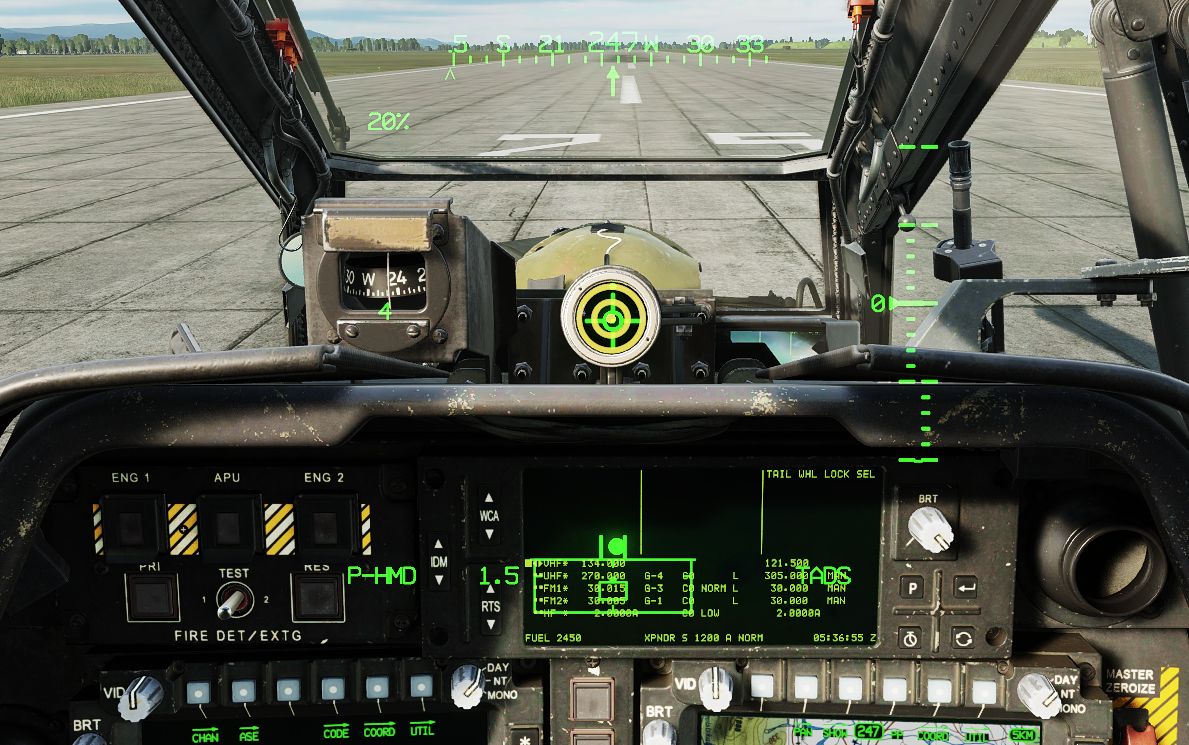
If you pull up the Controls Indicator (RCtrl + Enter) you can see what DCS is reading from your controls. The Collective input on the left side should match your HOTAS position 1:1. The slider outlined in green is your collective and should move with your HOTAS input. The double slider outlined in yellow is your throttle input, and should not be moving while you are taxiing or flying around. The torque percentage you see at the top-left of the IHADSS represents the torque on the rotor system, and will fluctuate and stabilize a bit after making input changes on the collective or cyclic. That being said, this number should not be stuck at 60% if you are pulling maximum collective.