Raven (Elysian Angel)
-
Posts
4244 -
Joined
-
Last visited
-
Days Won
4
Content Type
Profiles
Forums
Events
Everything posted by Raven (Elysian Angel)
-
With a Rhino, none of those shenanigans are necessary: it just works with the default settings.
-

First detent switch - toggled ?
Raven (Elysian Angel) replied to Dača's topic in Controller Questions and Bugs
Sure, but that note is about animation - and this thread is about keybinds. And the need for additional binds has already been reported: -
Keep in mind there's not just the amount of force for each effect, but also the frequency at which they occur. I tend to not touch these settings, but my current 'Low Pass Output Filters' are suggested by Walmis himself so I'm using those.
-
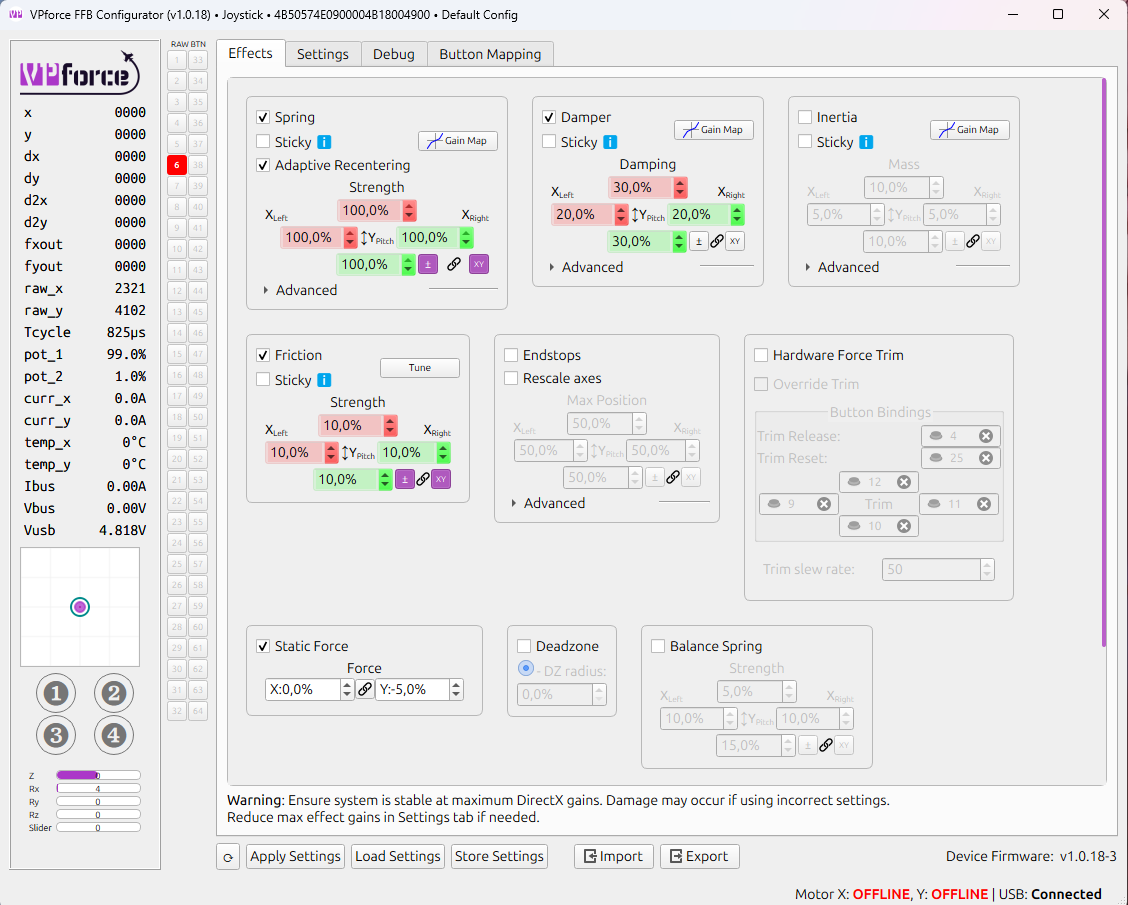
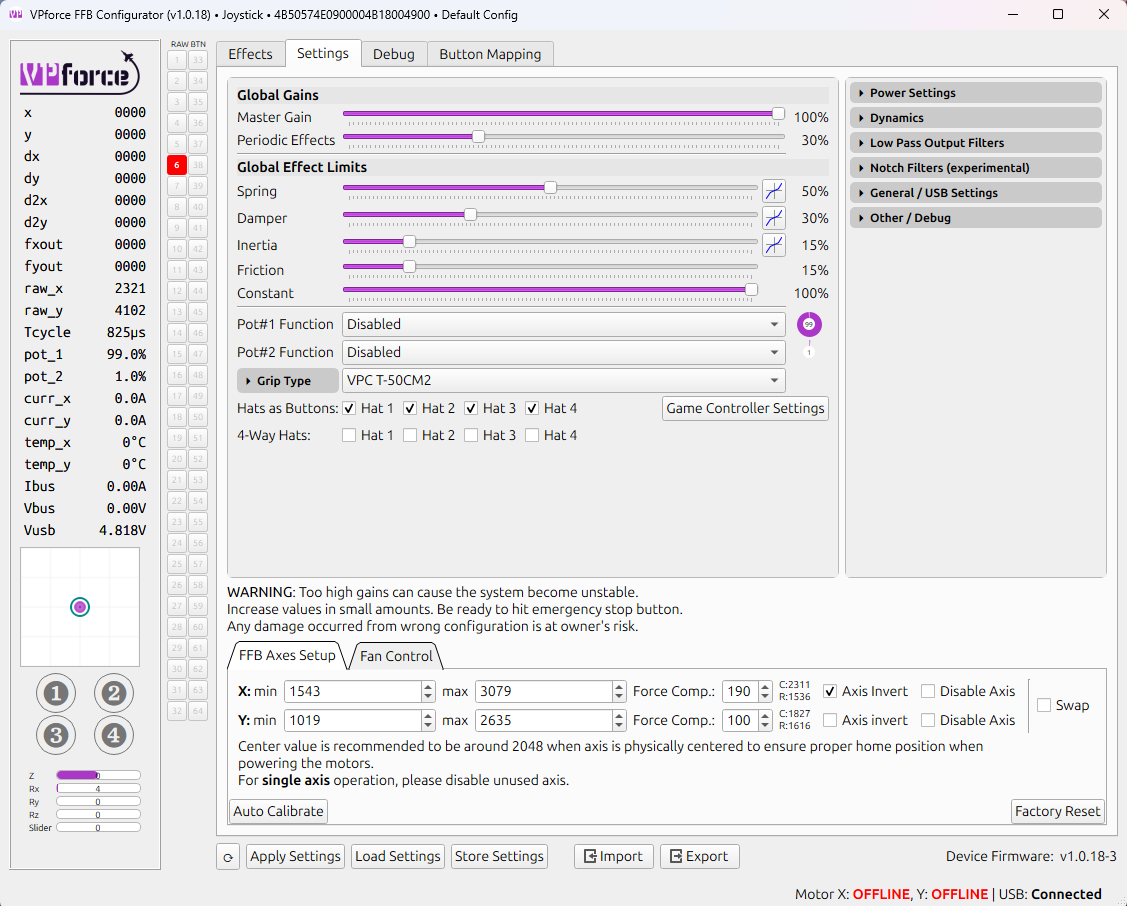
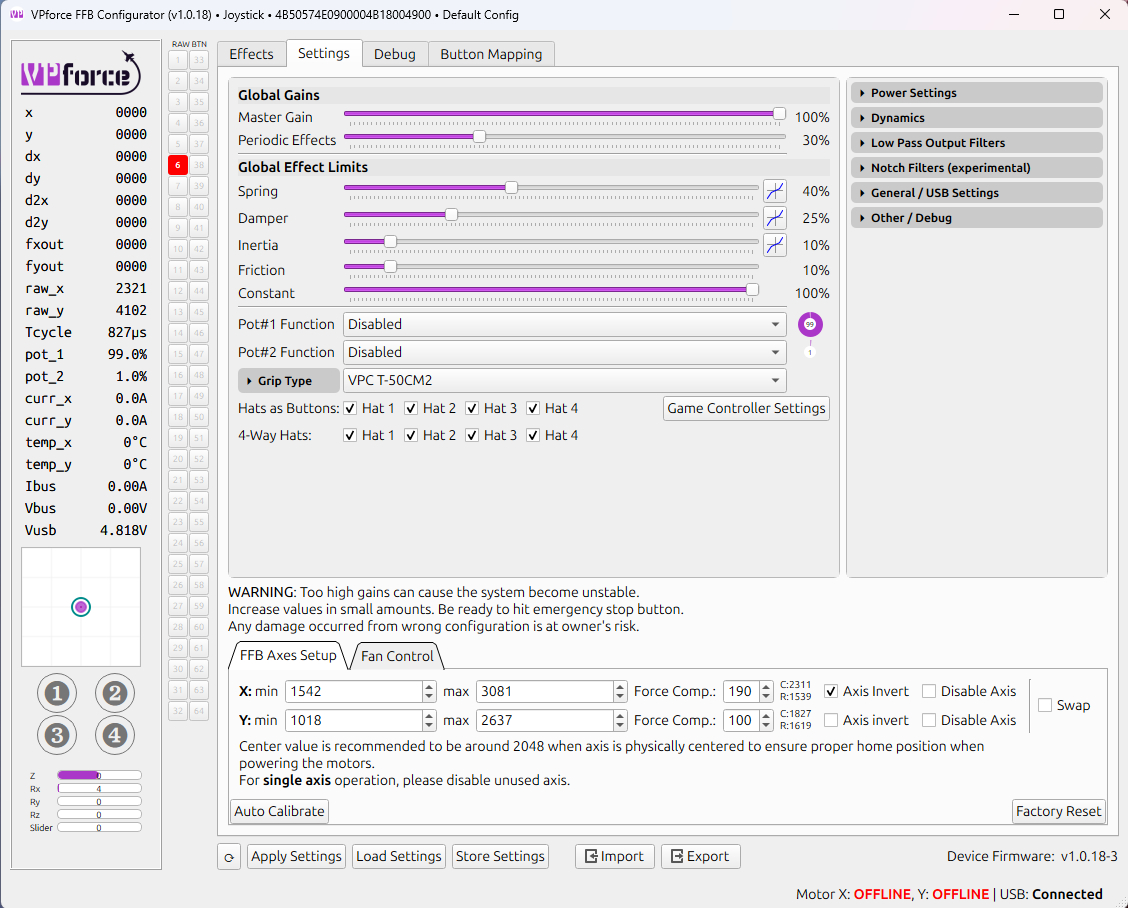
OK I'll show you my settings for comparison. Keep in mind I have different hardware, a different setup and likely a different grip and different extension. Your mileage may vary etc etc. The 'Effects' tab are (for me) global settings that I keep consistent across all profiles, but I may untick "Friction" for some profiles, such as my FBW profile. Ignore "Static Force": that's because my grip is offset from the centre of the base, so I need a bit of constant force in pitch away from me to prevent sag. The 'Settings' tab are modifiers that are calculated at the end of the equation that determines how much force is exerted by the FFB motors. The first screenshot (the one with 50% spring force) is my 3rd gen profile, and the other one (with 40% spring) is my 4th gen profile. I keep all forces at a lower level with more modern aircraft because you tend to throw them around more often, whereas with 3rd gen and older you need to be a lot more deliberate and careful with your inputs. Higher forces that you throw around more often equals more heat generation, and I want my hardware to last a long time so I take care of it. But generally, the things you need to be careful with are primarily Friction and Inertia, because they work in the opposite direction of other forces. Wrong settings can cause oscillations and even damage the motors. If I have Friction set to 10% in 'Effects' and 10% in 'Settings', the total amount of Friction is just 1% because 'Settings' are global modifiers at the end of the calculations. I wouldn't go above 2% personally. 1% and 1.5% are very noticeable and plenty to do the job. What helped me the most is 'Adaptive Recentring' in the 'Effects' tab: that needs to be at 100% or it won't have enough authority. That 100% means 100% of whichever spring force is exerted at any specific moment, so that's less around the centre position, and more as you pull Gs. It's also more with higher global modifiers. 100% of very little is still very little, but it might just be enough to do the job. I'm aware that Moza software is basically a copy of VPForce's software, but it might work differently for FFBeast. You might not have all of the configurability that I have, or perhaps you have more... Good luck!

-
reported Too much reflections iside the visor for VR
Raven (Elysian Angel) replied to Shmal's topic in Bugs and Problems
Already reported and acknowledged by ED. -
It’s way past midnight where I live, and I’m about to go to bed, but if it helps I can check tomorrow in my profiles and let you know what exactly is different in my F-4 and MiG-29 profiles. I have a “up to third gen jet” profile which I use for the F-4, Mirage F1 and as you might have guessed, all other jets up to third gen. For MiG-29 I use my “fourth gen non-FBW” profile, which I also use for F-15E for example.
-
My suspicion is that the the AFCS test uses the trim system in the background. That’s why I brought it up: if something interferes with trim forces somehow, it may prevent the test from successfully completing. But perhaps I’m mistaken. Did you try trimming to neutral and then hitting the AFCS OFF switch on the stick, as the training mission suggests in case of test failure? I had no issues with other modules either, but trimming in the F-4 felt weird until I fixed the settings I was referring to, and it also helped the F-14. In fact, it even made some helicopters easier to fly.
-
It might also have to do with your specific settings in whichever software FFBeast uses. I had issues with trimming in the F-4 and F-14 with my Rhino until I finetuned the settings - but it took a while for me to fully understand how the software works. It might be something related to either too much spring force or too little, or too much friction counteracting the spring force. All I know is that is works fine for me, but others have reported issues with it too, using a FFB stick. If I were you, I’d check the settings in the FFB software.
-
A number of years ago, Sven told me they had something else in mind after the Kiowa - it’s not my place to disclose what - but something might have happened to change that. We’ll see, I suppose…
-
A while ago there were rumours circulating that a V-22 was in development by an undisclosed 3rd party. I seem to remember even Wags hinted at it
-
First detent switch - toggled ?
Raven (Elysian Angel) replied to Dača's topic in Controller Questions and Bugs
Yes, we do: say the flip up trigger activates button 5 in the DCS bindings. That way “gun safety trigger up” is ‘Button 5’ and “gun safety down” is ‘Button 5_OFF’. This works just fine, as described above. But you don’t actually need 3 bindings, just 2: “gun safety up” is called “gun first detent” in the control bindings. -
First detent switch - toggled ?
Raven (Elysian Angel) replied to Dača's topic in Controller Questions and Bugs
I’m not sure how it works with VKB, but with my Virpil grip, I bind “gun first detent” to ‘flip trigger up’ and “gun second detent” to the first detent of my actual trigger. It works flawlessly: flipping up the trigger activates gun mode and makes the two-stage trigger available for use (it is no longer blocked by the flip up trigger). Flipping the trigger down deselects gun mode and returns to inboard/outboard whichever was in use. There is an alternative that also works. Simply use the flip up trigger in the up position as default, bind trigger down to “gun first detent” and pull flip up trigger to “gun second detent”. This also frees the use of the dual stage trigger for something else… Either way works, but the former is more intuitive to use in my opinion, since I often use the flip up trigger as master arm switch in other modules. -
First detent switch - toggled ?
Raven (Elysian Angel) replied to Dača's topic in Controller Questions and Bugs
Depends on which joystick you use. It works brilliantly with my T50CM2 grip. -
Since the update, I can't move past the loading screen
Raven (Elysian Angel) replied to Hikaruncat's topic in Game Crash
There seem to be 2 different problems that people have encountered with DCS since last patch. The first can be fixed by renaming/deleting the Mission Editor folder in Saved Games, and the second by turning off Secondary Shadows in the System menu. -
I've seen the fuel gauge display 1600km+ estimated remaining range: that buys you a lot of time in-between short hops into reheat.
-
I was so hyped for this release since I really love Soviet technology, but there were a few things that immediately jumped at me within 1 minute inside the cockpit that gave me a bad mood for the rest of the evening: cockpit units and those horrible visor reflections. At least both have been acknowledged by ED and will get fixed. I'll still fly it. Other than the units, the cockpit is HeatBlur-level of quality (really REALLY well done), and I simply love how it flies: Soviet DCS modules always 'clicked' with me
-
MiG-29 -Customer Feedback
Raven (Elysian Angel) replied to Hawkeye_UK's topic in DCS: MiG-29A Fulcrum
Yes I am one of them as well: I don't mind paying more if it means every single module is at least on par with A-10C when it comes to depth. Yes, that happened to me many many times: I have flown dead stick Ka-50s with missing pylons and tail shot off many times: sweaty hands guaranteed because of the hard work! I hope MiG-29 will sell very well! -
I didn't notice it at first either: only when I started looking around more for my wingmen did I see the pilot model clip through the ejection seat. And then I looked down, compared the position of my own shoulders to the shoulders of the pilot model, and I noticed a discrepancy.
-
Witnessing AI wingmen teleport around for the n-th time is getting old…
-
Ok then, what if you turn away and/or point the radar to a section of the sky where there are no targets, and then flip the radar switch to dummy and back to illuminate? The radar and WCS were not designed to work the way US systems do. Was it ever used independently of GCI to control/sanitise a piece of sky, successfully?
-
Anytime, Baby! - F-14 Docu-Campaign Announcement
Raven (Elysian Angel) replied to Reflected's topic in Community News
It’s great to know there’s more content for a module coming, even if it’s announced months or more before a release is feasible. Damned if you do, damned if you don’t… -
Yes I get that, but if there are either no other contacts, or all of the contacts are nose hot, what will the WCS do then? It is not meant to auto-highlight high closure-rate contacts, as you say.
-
Will it auto-highlight a new contact after the first one is taken out, even with the switch in the down position? It is something to test… For now I’m still building muscle memory on actually flying the plane and some basic emergency procedures such as 1-engine operations. I prefer to focus on aviate-navigate-communicate for the first week(s) or so after getting a new module. I’m in no rush to start blowing stuff up
-
It has been requested before, and the need has been acknowledged by ED. Funny thing is, that on my end the MiG-29’s cockpit is a mix of metric and imperial: HSI says miles but is using kilometres, fuel gauge says NM but is using KM, airspeed indicator is in KPH, true airspeed indicator is in knots, radar altimeter is in feet This truly shows how poorly thought out the system is, and highlights the need for special options. Or they simply could have left the system as is was, then it would have worked perfectly, instead of trying to make an ‘80s Soviet aircraft display imperial units…
-
Did you try the target unlock button? In any case, I’d not treat the system as TWS/RWS, but simply as a soft auto-target feature to ease pilot workload - so you don’t have to operate the TCS (which is on the stick) and fly the aircraft manually at the same time.