Floyd1212
-
Posts
1375 -
Joined
-
Last visited
Content Type
Profiles
Forums
Events
Everything posted by Floyd1212
-
can not reproduce Autopage not syncronized in multicrew
Floyd1212 replied to FalcoGer's topic in Bugs and Problems
Had this happen again tonight. I got the aircraft all started up solo, and as I throttled up the engines I got a low RPM warning which switched my left MPD to the A/C page. After that, my human CPG joined and started doing some setup of the front seat. He was on TSD page and pressed T3 for SHOW, then T6 for COORD SHOW, then L4 for ENEMY UNITS. This then disabled the Collective channel of the FMC. Something was out of sync when he got in the aircraft, and from the back seat it appears he was on the A/C page, and pressed UTIL at T6, then COLL at L4, disabling the collective channel. I got the warning on the EUFD that FMC was disabled, but he did not. When I re-enabled the coll channel from the back, the warning went away for me and it showed up on his EUFD as being disabled. At that point, we were out of sync for the remainder of the flight. -
With no binds for the throttle axis at all, and using the mouse to raise the throttles in the cockpit, the problem still occurs? Check that axis across all your controls. DCS likes to auto assign axis to controllers that you never intend to use for those functions.
-
Thanks for the update!
-
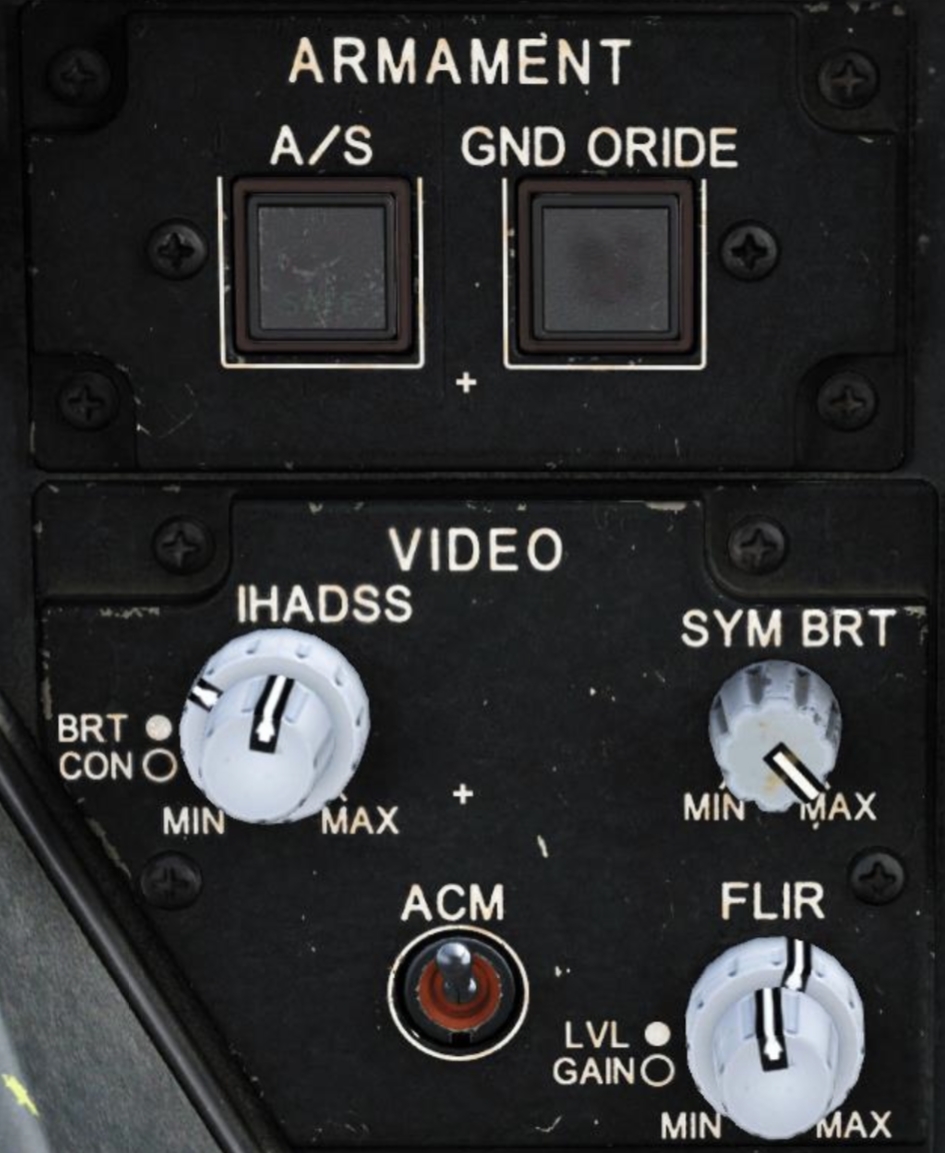
Between the left MPD and the keyboard unit are the controls for the IHADSS brightness and contrast. Make sure the SYM BRT knob is turned up. If that doesn’t fix it, maybe hop into an instant action hot start mission without your flight controls even plugged in and see if the IHADSS is working in that scenario.

-
fixed IAT stops tracking when another track is deleted
Floyd1212 replied to ThatSillyGinge's topic in Bugs and Problems
I don't think this behavior was introduced with 2.9; we were seeing this prior to that. You would have a missile in the air on the second target, and all of a sudden the TADS would drift off the target and you would have to use the "MTT Promote" function to get the TADS "slaved" back onto the target. Not sure if this is correct behavior or not, though. -
Maybe the radar altimeter is located in/near the tail and as you yank the stick back the tail drops and briefly shows a reduction in altitude before the aircraft starts to climb?
-
This also happens to you in a single-player quick start mission, on all maps? What about a hot start and you shut down the engines and bring them back up again?
-
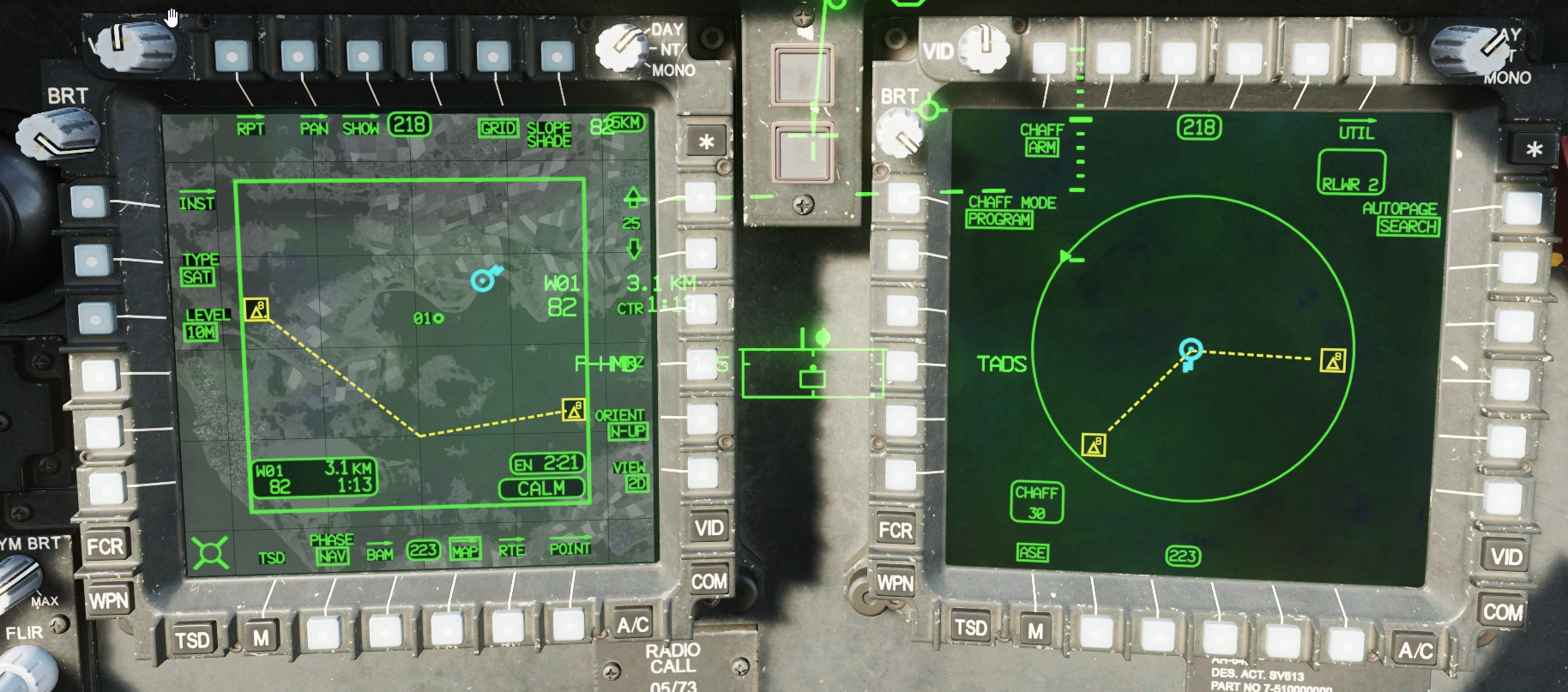
Here is another track file to instantly demonstrate the issue/question. ASE Test.trk The ASE Page (right) shows the true orientation of the threats in relation to the aircraft; 3 o'clock and 7 o'clock. The same threats on the TSD Page (left) when set to N-UP show the dotted line drawn back to the lower-center of the map, where your ownship would be shown when set to Heading-UP mode. This gives you the impression that the threats are at 1 o'clock and 9 o'clock from your current position and orientation. Is this how it works IRL?
-
This is an older thread, but still a good place to start. Since then IAT and LST have been introduced. And when FCR is implemented, you will need additional controls for that.
-
cannot reproduce IAT drifting / stored point drifting
Floyd1212 replied to Akenar-99's topic in Bugs and Problems
Sorry, I was asking @Akenar-99, the OP. -
cannot reproduce IAT drifting / stored point drifting
Floyd1212 replied to Akenar-99's topic in Bugs and Problems
What control are you using to slew the TADS around? A 4-way hat? A thumbstick on your HOTAS? Your primary X/Y axis of the joystick? -
Even if you enlist George’s help to rifle the missile, he won’t write down those coordinates for you, or indicate which direction you need to point the helo. if the JTAC script supports it, you can have them “sparkle” the target while you observe with NVGs on. To get George to send the missile, set him to LOAL, and whatever trajectory you need (LO/HI) to clear your obstruction.
-
I could be wrong, but I don’t think you need to have your own info in the preset, just the other members of the flight group. They, of course, have to have you, and you have to have them. I think this is how we were setting it up, but I will double-check the next time we fly.
-
closed for repated off topic DCS 2.9 AH-64 ATT Hold Not Working
Floyd1212 replied to AndreNL's topic in Bugs and Problems
Sounds like maybe you would be better served on the stable branch? Open Beta may not be for everyone… -
closed for repated off topic DCS 2.9 AH-64 ATT Hold Not Working
Floyd1212 replied to AndreNL's topic in Bugs and Problems
Other threads (or maybe even this one) mention a wind component to the issue, so maybe you are flying in a zero-wind environment? It definitely isn't just a user issue. At one point I had established a very stable manual hover with less than 1 knot of drift, and when I enabled ATT Hold, the aircraft worked its way into an oscillation that exceeded 50 knot swings forward and backward. -
I just created a test mission with a similar Roland group and an air spawn and the RWR called each of the 4 units out once, then never again. Maybe it's something with how that mission is setup, or with the number of units in the mission?
-
Here is a short track of me taking off from the FARP, flying out a bit and then heading back in. It looks like there are 4 units in the Roland group with radars, so maybe I am getting 4x the number of warnings I would if it were just a single SA-8 or something? This is on SPQR Caucasus, taking off from the FARP in Sector 14. It does repeat the same units as I fly toward them and over them, and the position call-outs seem a little delayed. For example, I fly over them and the RWR is still calling them as 12 o'clock. Should the same group be triggering multiple times within such a short time-frame and without having lost LOS to the threat? (On a side note, at one point you see me zooming into my right MPD where I had brought up the ASE overlay on the video window using my touchscreen monitor with Helios. For some reason the track didn't pick up those button presses, so it doesn't show the ASE page. This may be a new bug with 2.9 and the way the tracks were changed as I'm pretty sure that used to work in older tracks.) RLWR Active.trk
-
Anyone else getting this since 2.9 dropped? Seems like the RWR is calling out the same warnings incessantly. As I'm flying away from a friendly FARP I hear "Roland, 6 o'clock" about 30 times until I get over the hill, then it's non-stop warnings from every radar on the far side of the hill... I'll post a track if needed, but surely someone internally has reported this?
-
reported earlier INU drift and Lima tracking bug
Floyd1212 replied to 84-Simba's topic in Bugs and Problems
Were there changes made in 2.9 on how the Limas behave? (I don't recall seeing anything specific mentioned in the patch notes.) Or were changes made prior to 2.9? I'll load up 4 full racks of Limas and see how things go. I have been taking just a couple Limas for targeting SAMs, and I will say they have been working better for us recently. -
reported earlier INU drift and Lima tracking bug
Floyd1212 replied to 84-Simba's topic in Bugs and Problems
We flew on a public server last night, and the flight to the AO was about 17 minutes where we then engaged two vehicles in a group of 6 with Limas at a range of around 6km. We did not do an INU reset. Both tracked their intended targets and destroyed them. I'm not saying there still aren't some issues with Limas finding their intended target, but I wouldn't say it is a given that they will miss. -
In that last screenshot, it looks like you still have Preset 1 set to VHF? Instead, you could just edit Preset 4 which is already configured for FM2. I haven’t tried to change which radio is assigned to which preset, so I’m not sure what the correct procedure is there. Also, are there other aircraft in the mission that might also be on ID 1 & 2?
-
You do not have to rely on it being pre-setup in the ME to get it to work. We were able to hop into a pub server and edit our IDs and call signs, and add each other to the database and get it working between a few of us. Keep in mind, it doesn’t seem to work very well from the front seat yet, but the PLT can send and request all the info we have tried.
-
Operation Horizon - single player or multicrew
Floyd1212 replied to Don Rudi's topic in Missions and Campaigns
It's a reported bug in 2.9. A search for "waypoint" reveals two threads where this has been discussed. https://forum.dcs.world/search/?q=waypoint&quick=1&type=forums_topic&nodes=780 -
Are you asking how to export one of the MFDs, and make it larger on your second monitor?
-
Don't forget Bradmick's video series. But you'll have to actually pay attention to those, too. https://forum.dcs.world/topic/296437-ah-64d-flight-school-w-video-tutorials/ Between Wags and Bradmick, you can get a rundown on how to use all of the systems. Casmo's content isn't very "tutorial" in nature, but still entertaining.